Unicode Combining Characters Explained
Combining characters are some of the most useful and most misunderstood characters in Unicode. They put the accent on “é,” the line through s̶t̶r̶i̶k̶e̶t̶h̶r̶o̶u̶g̶h̶ text, and the chaos in Zalgo text. This guide explains what they are, how software draws them, and why the same text can be stored in more than one way.
Base characters and combining marks
Unicode splits characters into two broad kinds:
- Base characters, such as letters, digits and symbols, take up their own space on a line.
- Combining characters (marks) have no space of their own. They attach to the base character in front of them and are drawn on, above, through or below it.
A base character followed by any number of marks forms one visible unit. Unicode calls this a grapheme cluster, and it is what people think of as “one character.” When you press backspace or move the cursor, most apps treat the whole cluster as a single step.
Where combining marks live
| Block | Range | Examples |
|---|---|---|
| Combining Diacritical Marks | U+0300 to U+036F | Accents, tildes, strokes, underlines |
| Combining Diacritical Marks Extended | U+1AB0 to U+1AFF | Extra marks for phonetics and dialects |
| Combining Diacritical Marks Supplement | U+1DC0 to U+1DFF | Marks for historic and specialist writing |
| Combining Marks for Symbols | U+20D0 to U+20FF | Arrows over symbols, enclosing circles, the keycap in 1️⃣ |
| Combining Half Marks | U+FE20 to U+FE2F | Marks that span two letters |
Many scripts, including Hindi, Arabic, Hebrew and Thai, also have their own combining marks for vowels and tones. For those languages, combining characters are an everyday part of writing.
How marks are drawn
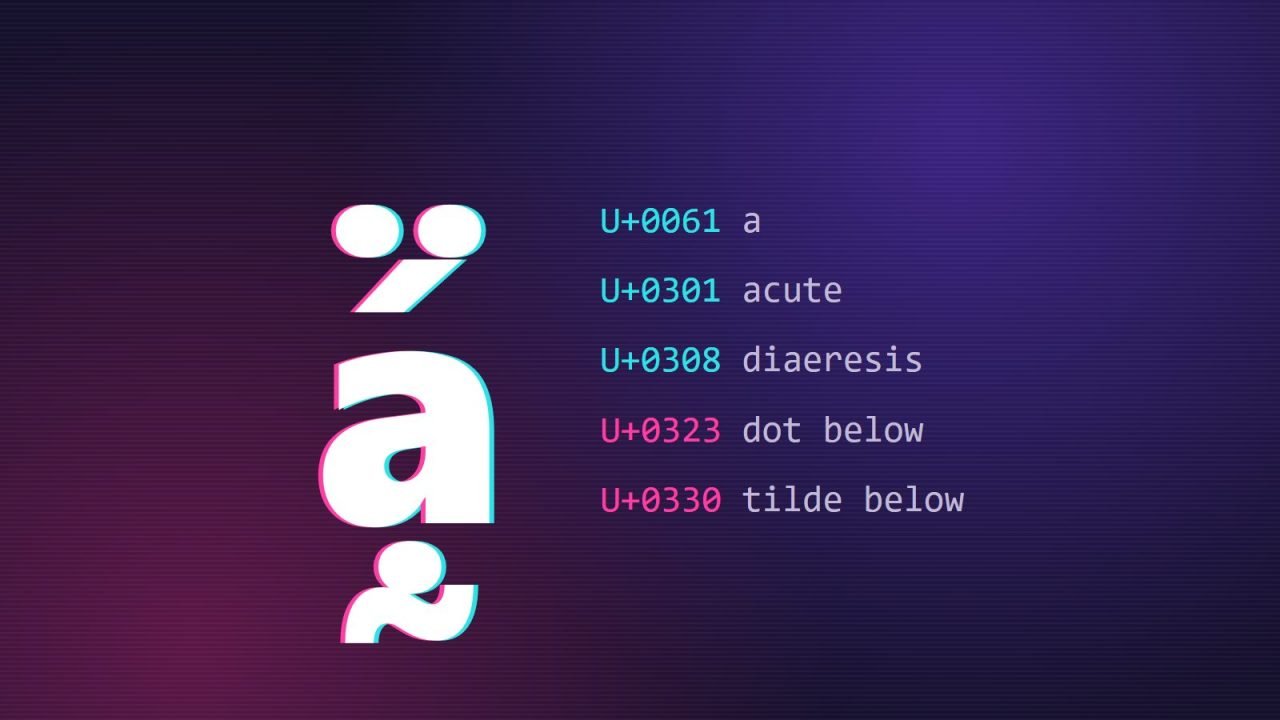
When a font has a precise position for a mark on a letter, the text engine uses it. When it does not, the engine places the mark in a default spot and stacks any further marks on top of the last one, moving outward from the letter. Each mark also has a combining class, a number that says where it goes: above, below, overlaying, and so on. Marks in different classes do not interfere with each other, so an accent above and a dot below can be typed in either order.
There is no limit to how many marks can follow a letter. That is all Zalgo text is: a letter followed by dozens of marks, which the engine stacks into towers that spill out of the line.
Two ways to store the same text
Many common accented letters have a ready-made, precomposed character. “é” can be stored as the single character U+00E9, or as “e” (U+0065) followed by a combining acute accent (U+0301). Both look identical, but a computer comparing them byte by byte sees two different strings.
Unicode solves this with normalization, which converts text into a standard form:
- NFC (composed) uses precomposed characters wherever they exist. Most web text is stored this way.
- NFD (decomposed) splits every precomposed character into a base and its marks.
- NFKC and NFKD also replace “compatibility” characters, such as styled math letters and full-width letters, with their plain equivalents.
The Zalgo text remover uses these forms. It composes the text with NFC so real accents become single characters, then deletes the leftover marks, and uses NFKC to turn fancy fonts back into normal letters.
Combining characters in text tools
- Strikethrough and underline: adding the same mark, such as U+0336, after every letter draws a continuous line. Try the strikethrough text generator.
- Glitch and Zalgo text: random marks above, through and below every letter. See the glitch text generator.
- Cursed text: look-alike letters plus a dusting of marks, in the cursed text generator.
Things that trip people up
- Counting characters: “é” can be one or two code points depending on how it was typed. Character limits on sites may count either.
- Reversing text: reversing code points moves each mark onto the wrong letter. Good tools reverse whole grapheme clusters instead.
- Searching: a search for “cafe” may not find “café,” and a search for “café” in NFC may not match the NFD form, unless the software normalizes first.